
 English

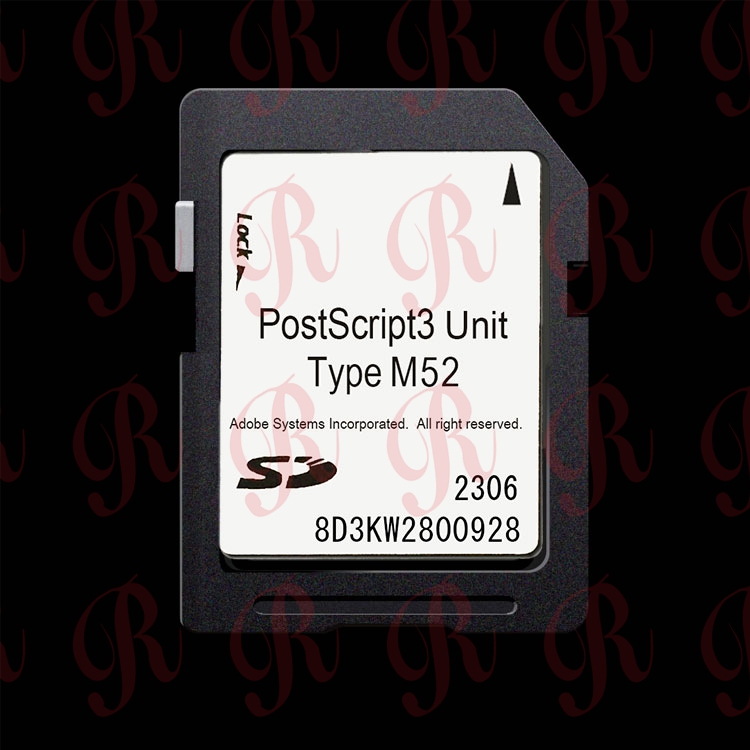
PostScript3 Unit Type M52 Compatibility: Ricoh IM C2510, C3010, C3510, C4510, C6010
PostScript3 Unit Type M52 Compatibility: Ricoh IM C2510, C3010, C3510, C4510, C6010
If you have a used Ricoh IM C2510, C3010, C3510, C4510 or C6010 color MFP and the genuine PostScript option is missing, the module you need is the PostScript3 Unit Type M52 (EDP code 419416). This guide lists the machines Type M52 fits, how to tell it apart from nearby unit types, and what to verify before you order for your stock or your customer.
Which Ricoh Machines Does Type M52 Fit?
Type M52 is designed for the Ricoh IM C 2510-to-6010 color MFP family. The confirmed compatibility list:
|
Machine Model |
Machine Type |
PostScript Option |
EDP Code |
|
Ricoh IM C2510 |
Color MFP |
Type M52 |
419416 |
|
Ricoh IM C3010 |
Color MFP |
Type M52 |
419416 |
|
Ricoh IM C3510 |
Color MFP |
Type M52 |
419416 |
|
Ricoh IM C4510 |
Color MFP |
Type M52 |
419416 |
|
Ricoh IM C6010 |
Color MFP |
Type M52 |
419416 |
Always read the full model name from the operation panel before matching the unit. A machine that looks similar can belong to an older generation, and a mismatched module will not activate correctly.
Do Not Mix Up Type M52 With Nearby Units
Several Ricoh PostScript3 Units look similar from the outside, but they are built for different machine families:
|
Machine Family |
Correct Unit Type |
Note |
|
IM C2510 / C3010 / C3510 / C4510 / C6010 |
Type M52 |
Color mid-family covered in this guide |
|
IM C2000 / C2500 / C3000 / C3500 / C4500 / C6000 |
Type M37 |
Older IM C color generation; not interchangeable with M52 |
|
IM 370 / IM 370F / IM 460F / IM 460FTL |
Type M54 |
Desktop black-and-white family |
|
IM 2500 / 3000 / 3500 / 4000 / 5000 / 6000 (B&W) |
Type M45 |
High-volume monochrome family |
What Type M52 Does Once Installed
After the card is installed and the machine reboots, the controller reports PostScript3 as an installed option under User Tools > Machine Features > Option, and the PostScript3 driver choice becomes available on the PC. Complex color PDFs, vector logos and color-managed proofs render through the printer-side PostScript path, so output stays closer to the original file across different source computers.
Quick Check Before You Order
1. On the operation panel, open the machine information screen and record the exact model name, including any suffix letter.
2. Confirm the machine is on the Type M52 list above; if it is not, check the matching type for its family.
3. After installation, verify the option appears in User Tools > Machine Features > Option and that the driver offers the PostScript3 choice.
4. Print one layered PDF, one vector logo and one color page to compare font edges, shapes and color consistency.
FAQ
Does Type M52 work on IM C2000, C2500 or C3000?
No. Those machines belong to the older IM C generation and take Type M37, not Type M52. Send the exact machine name if you are unsure which family it falls into.
Is EDP 419416 the code for Type M52?
Yes, Type M52 is listed under EDP code 419416. Match both the model family and the EDP code before ordering.
Will Type M52 fit a black-and-white Ricoh machine?
No. Type M52 is for the IM C2510-to-C6010 color family. Black-and-white models use a different type, such as Type M45 or Type M54 depending on the machine.
Is the unit plug-and-play?
Insert the module into the marked slot, reboot the machine, and confirm the option in the menu. No firmware flashing is described here; if the option does not appear, re-check the machine model and seating.
Do you supply Type M52 at wholesale?
Yes, we supply genuine Ricoh PostScript3 Units by machine type to distributors, refurbishers and copier dealers. Share your machine models and quantity for a wholesale quote.
Contact ricohunit.com for wholesale pricing: [email protected]